› MySQL 5.5 Community Server
› MySQL 5.6 Community Server
› Percona Configuration Wizard
› XtraBackup 搭建主从复制
Great Sites on MySQL
› Percona
› MySQL Performance Blog
› Severalnines
推荐管理工具
› Sequel Pro
› phpMyAdmin
推荐书目
› MySQL Cookbook
MySQL 相关项目
› MariaDB
› Drizzle
参考文档
› http://mysql-python.sourceforge.net/MySQLdb.html
itechify
V2EX  ›  MySQL

MySQL explain key_len 和联合索引问题

  •  
  •   itechify · Apr 26, 2022 · 3131 views
    This topic created in 1613 days ago, the information mentioned may be changed or developed.

    大佬们,最近复习 mysql 索引,有个问题求解答。 看的图灵视频,有涉及到 explain 的 key_len 字段,用来判断查询语句中用了某个组合索引的哪些列。 视频里有个结论比较疑惑,如下图:
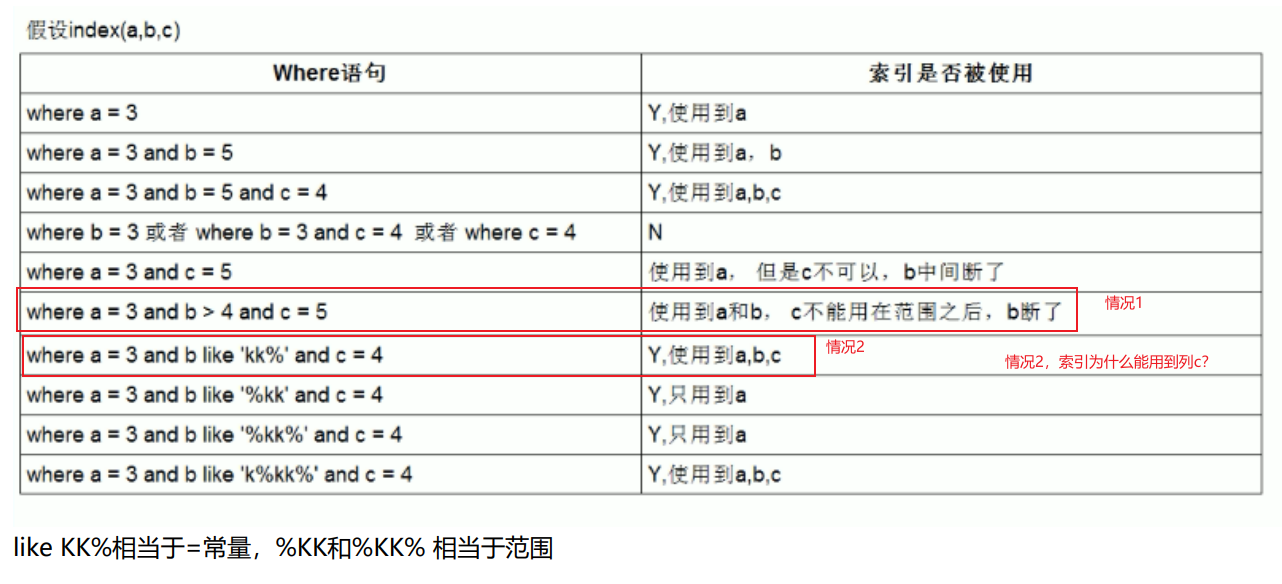
    不太明白红色框的两种情况。

    本地测试 SQL:

    CREATE TABLE `foo` (
      `id` int(10) NOT NULL AUTO_INCREMENT COMMENT '自增主键',
      `a` varchar(7) NOT NULL DEFAULT '',
      `b` int(11) NOT NULL DEFAULT '1',
      `c` varchar(3) NOT NULL DEFAULT '',
      PRIMARY KEY (`id`),
      KEY `idx_common_01` (`a`,`b`,`c`) USING BTREE
    ) ENGINE=InnoDB AUTO_INCREMENT=1 DEFAULT CHARSET=utf8;
    
    EXPLAIN SELECT a,b,c FROM foo where a = 'a1' and b > 1  and c = 'cc'
    -- key_len 计算:
    -- a 列 7*3+2 = 23
    -- b 列 4
    -- c 列 3*3+2 = 11
    -- 如用了 a,b 列,则 key_len=27
    -- 如用了 a,b,c 列,则 key_len=38
    
    CREATE TABLE `bar` (
      `id` int(10) NOT NULL AUTO_INCREMENT COMMENT '自增主键',
      `a` varchar(7)  NOT NULL DEFAULT '',
      `b` varchar(10) NOT NULL DEFAULT '',
      `c` varchar(3)  NOT NULL DEFAULT '',
      PRIMARY KEY (`id`),
      KEY `idx_01` (`a`,`b`,`c`) USING BTREE COMMENT 'abc 索引'
    ) ENGINE=InnoDB AUTO_INCREMENT=1 DEFAULT CHARSET=utf8;
    
    EXPLAIN SELECT a,b,c FROM bar where a = 'a1' and b like 'x%' and c = 'cc'
    -- key_len 计算:
    -- a 列 7*3+2 = 23
    -- b 列 10*3+2 = 32
    -- c 列 3*3+2 = 11
    -- 如用了 a,b 列,则 key_len=58
    -- 如用了 a,b,c 列,则 key_len=66
    

    计算背景:字符集为 utf8
    varchar 列不允许 null ,key_len=长度 x3+2
    如列 a 定义:varchar(12) not null default '', a 列的 key_len=12*3+2=38
    int 列不允许 null ,key_len=4
    如列 b 定义:int(11) not null default '1', b 列的 key_len=4

    第一种情况比较好理解,第二个情况where a='xx' and like 'x%' and c='xx'为什么能用到 c 列呢?(本地测试 key_len 计算后确实用到了 c 列)

    13 replies  •  2022-04-27 16:21:18 +08:00
    spicecch
        1
    spicecch  
       Apr 26, 2022
    我看高性能 mysql 第三版上说的第二种情况是只能用到 a 和 b 索引。
    原文:如果查询中有某个列的范围查询,则其右边所有列都无法使用索引优化查找。
    like 'x%' 是属于范围查询了吧
    itechify
        2
    itechify  
    OP
       Apr 26, 2022
    @spicecch #1
    可是,确实使用了 a,b,c 三个列呢😂
    ![]( https://cdn.liuzhicong.cn/img/20220426192325.png)
    Droi
        3
    Droi  
       Apr 26, 2022
    覆盖索引,没有回表,select 的字段都在索引上。为什么会认为没有用到 c
    itechify
        4
    itechify  
    OP
       Apr 26, 2022 via Android
    @Droi 情况 1 也是覆盖索引呀
    spicecch
        5
    spicecch  
       Apr 26, 2022 via iPhone
    由于 B+树的索引顺序,是按照首字母的大小进行排序,前缀匹配又是匹配首字母。所以可以在 B+树上进行有序的查找,查找首字母符合要求的数据。所以有些时候可以用到索引
    应该是 b 字段里有 x 开头的值,刚好索引生效了
    Droi
        6
    Droi  
       Apr 26, 2022
    个人认为通配符%开头 左模糊 算是范围查询使用索引失效。x%能确定一个字符,不用走全表要优先使用索引。情况一非常明确是满园查询了。
    XiLemon
        7
    XiLemon  
       Apr 26, 2022
    情况 2 是索引下推
    aababc
        8
    aababc  
       Apr 26, 2022
    我觉得你可以把情况 1 改成 >= 4 试试看
    swczxf
        9
    swczxf  
       Apr 27, 2022
    没有说 MySQL 版本,这两种情况在 MySQL5.7 似乎都是只使用 a 列。个人理解是执行计划只是优化器给出的规则而已,是不是这两种情况都用 abc 列也未偿不可呢
    itechify
        10
    itechify  
    OP
       Apr 27, 2022
    @XiLemon 应该是的,谢谢
    itechify
        11
    itechify  
    OP
       Apr 27, 2022
    @aababc #8 谢谢,试了下,情况 1 在这个条件也用了 c 列。应该是 7 楼所说的索引下推
    itechify
        12
    itechify  
    OP
       Apr 27, 2022
    @swczxf #9 是的,两种情况都可能用到 a,b,c 列
    asmile1993
        13
    asmile1993  
       Apr 27, 2022
    情况 1 和情况 2 都可以用到索引中的 c 字段 — 使用 use index condition 。问题的关键在于有能力使用到,但不是一定会用到,use index condition 是一种优化的方法,在大部分情况下对性能提升没有那么明显。在你的查询语句中,你查询条件中的列和查询的列都是列 a ,b ,c ,那么直接走你建立的索引就好了。如果你对表多添加几个列,比如 d ,e ,f ,索引不变,查询条件保持不变,直接 select * 去查询数据,会发现用不上了 c ,因为直接无法使用索引就返回数据,还需要回表查询一次。


    #### MySQL 版本
    8.0.26


    #### 表结构
    CREATE TABLE `foo` (
    `id` int NOT NULL AUTO_INCREMENT COMMENT '自增主键',
    `a` varchar(7) NOT NULL DEFAULT '',
    `b` int NOT NULL DEFAULT '1',
    `c` varchar(3) NOT NULL DEFAULT '',
    `d` int DEFAULT NULL,
    `e` int DEFAULT NULL,
    `f` int DEFAULT NULL,
    PRIMARY KEY (`id`),
    KEY `idx_a_b_c` (`a`,`b`,`c`) USING BTREE
    ) ENGINE=InnoDB DEFAULT CHARSET=utf8mb3 ;


    CREATE TABLE `bar` (
    `id` int NOT NULL AUTO_INCREMENT COMMENT '自增主键',
    `a` varchar(7) NOT NULL DEFAULT '',
    `b` varchar(10) NOT NULL DEFAULT '',
    `c` varchar(3) NOT NULL DEFAULT '',
    `d` int DEFAULT NULL,
    `e` int DEFAULT NULL,
    `f` int DEFAULT NULL,
    PRIMARY KEY (`id`),
    KEY `idx_a_b_c` (`a`,`b`,`c`) USING BTREE
    ) ENGINE=InnoDB DEFAULT CHARSET=utf8mb3;

    #### 执行语句及执行计划
    其中 used_key_parts 代表使用到索引中的哪几个列

    root@localhost [zst]>EXPLAIN format=json SELECT * FROM bar where a = 'a1' and b like 'x%' and c = 'cc'\G
    *************************** 1. row ***************************
    EXPLAIN: {
    "query_block": {
    "select_id": 1,
    "cost_info": {
    "query_cost": "0.71"
    },
    "table": {
    "table_name": "bar",
    "access_type": "range",
    "possible_keys": [
    "idx_a_b_c"
    ],
    "key": "idx_a_b_c",
    "used_key_parts": [
    "a",
    "b"
    ],
    "key_length": "66",
    "rows_examined_per_scan": 1,
    "rows_produced_per_join": 1,
    "filtered": "100.00",
    "index_condition": "((`zst`.`bar`.`a` = 'a1') and (`zst`.`bar`.`b` like 'x%') and (`zst`.`bar`.`c` = 'cc'))",
    "cost_info": {
    "read_cost": "0.61",
    "eval_cost": "0.10",
    "prefix_cost": "0.71",
    "data_read_per_join": "88"
    },
    "used_columns": [
    "id",
    "a",
    "b",
    "c",
    "d",
    "e",
    "f"
    ]
    }
    }
    }

    root@localhost [zst]>EXPLAIN format=json SELECT a, b, c FROM bar where a = 'a1' and b like 'x%' and c = 'cc'\G
    *************************** 1. row ***************************
    EXPLAIN: {
    "query_block": {
    "select_id": 1,
    "cost_info": {
    "query_cost": "0.35"
    },
    "table": {
    "table_name": "bar",
    "access_type": "index",
    "possible_keys": [
    "idx_a_b_c"
    ],
    "key": "idx_a_b_c",
    "used_key_parts": [
    "a",
    "b",
    "c"
    ],
    "key_length": "66",
    "rows_examined_per_scan": 1,
    "rows_produced_per_join": 1,
    "filtered": "100.00",
    "using_index": true,
    "cost_info": {
    "read_cost": "0.25",
    "eval_cost": "0.10",
    "prefix_cost": "0.35",
    "data_read_per_join": "88"
    },
    "used_columns": [
    "a",
    "b",
    "c"
    ],
    "attached_condition": "((`zst`.`bar`.`a` = 'a1') and (`zst`.`bar`.`b` like 'x%') and (`zst`.`bar`.`c` = 'cc'))"
    }
    }
    }
    About   ·   Help   ·   Advertise   ·   Blog   ·   API   ·   FAQ   ·   Privacy   ·   Solana   ·   985 Online   Highest 6679   ·     Select Language
    创意工作者们的社区
    World is powered by solitude
    VERSION: 3.9.8.5 · 40ms · UTC 23:07 · PVG 07:07 · LAX 16:07 · JFK 19:07
    ♥ Do have faith in what you're doing.