
1 月 21 日到手,去掉假期,平均一天写入 1TB,这 swap 也太狠了吧
家里装了六七年的台式机的系统盘,写入量也才和这个一个月差不多,照这么下去,用不到一年固态硬盘就得先报废啊
你们的使用情况如何?可以用下面的命令查看下
brew install smartmontools

smartctl -a /dev/disk2
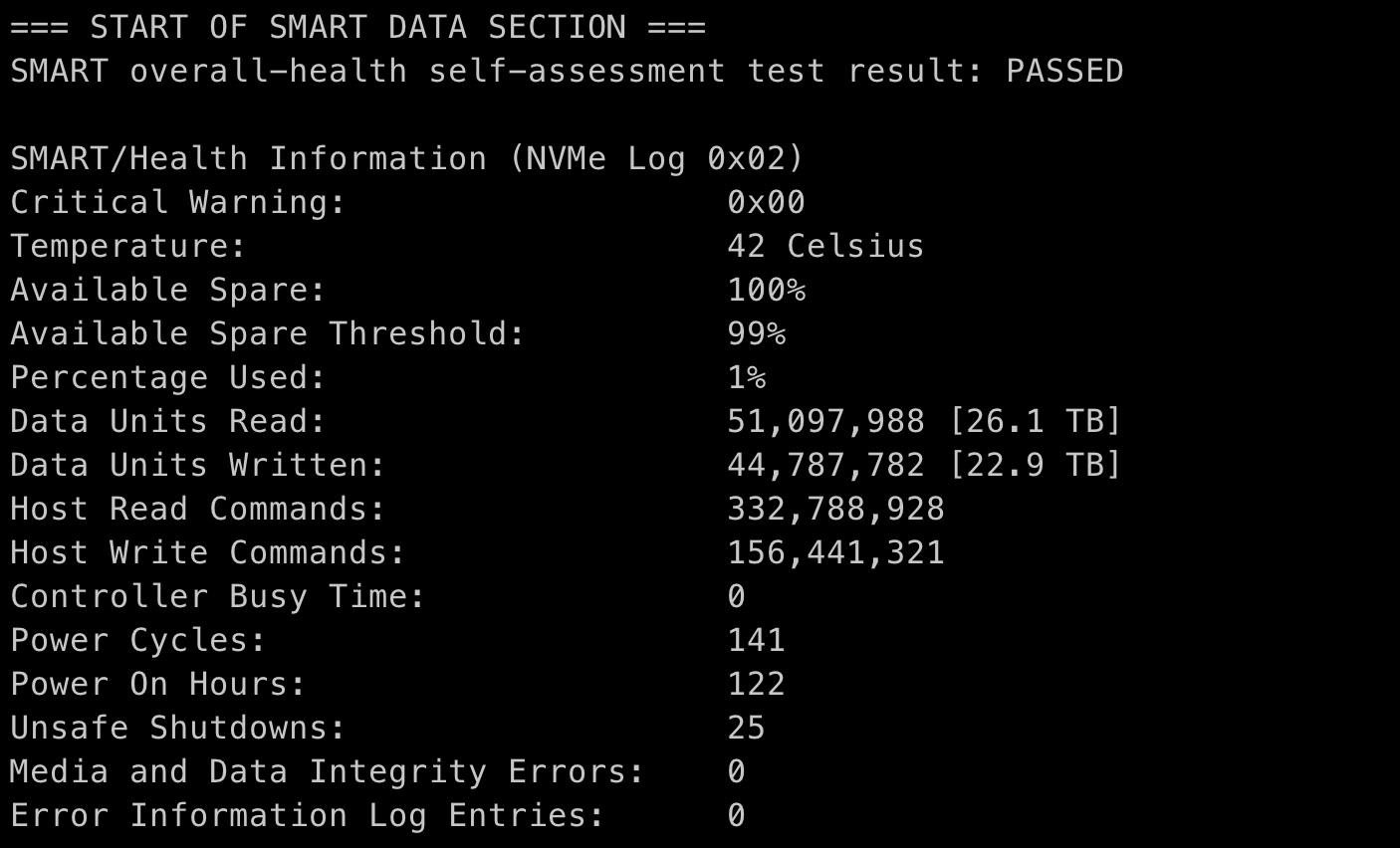
1 月 21 日到手,去掉假期,平均一天写入 1TB,这 swap 也太狠了吧
家里装了六七年的台式机的系统盘,写入量也才和这个一个月差不多,照这么下去,用不到一年固态硬盘就得先报废啊
你们的使用情况如何?可以用下面的命令查看下
brew install smartmontools
smartctl -a /dev/disk2
 |
1
平均一个小时写 187.7GB ,虽然意料内,但看着还是有点夸张
|
 |
huandaerenFeb 23, 2021
2
我的入手时间差不多,同配置。
只有几个 Tb 。。。。 SMART/Health Information (NVMe Log 0x02) Critical Warning: 0x00 Temperature: 37 Celsius Available Spare: 100% Available Spare Threshold: 99% Percentage Used: 0% Data Units Read: 6,298,669 [3.22 TB] Data Units Written: 4,640,459 [2.37 TB] Host Read Commands: 74,426,052 Host Write Commands: 58,127,837 Controller Busy Time: 0 Power Cycles: 111 Power On Hours: 54 Unsafe Shutdowns: 8 Media and Data Integrity Errors: 0 Error Information Log Entries: 0 |
 |
3
swap 大法好,8G M1 吊打 16G x86,年年焕新,皆大欢喜
我编不下去了 |
 |
douglas1997Feb 23, 2021
5
你这个也太多了,我用了快半年了才 30TB 。
SMART/Health Information (NVMe Log 0x02) Critical Warning: 0x00 Temperature: 53 Celsius Available Spare: 100% Available Spare Threshold: 10% Percentage Used: 2% Data Units Read: 65,999,474 [33.7 TB] Data Units Written: 55,588,722 [28.4 TB] |
|
douglas1997Feb 23, 2021
6
时间:
Power Cycles: 8,271 Power On Hours: 2,083 |
 |
7
@huandaeren #2 Power On Hours 不到我的一半,看来你使用的很少
|
 |
xiaooloongFeb 23, 2021
8
三个多月的末代 intel
Data Units Read: 6,588,472 [3.37 TB] Data Units Written: 5,696,176 [2.91 TB] Power Cycles: 103 Power On Hours: 99 |
|
9
@douglas1997 #5 你的内存多大? 8g 内存下 swap 频繁读写,太耗硬盘了
|
 |
c2000aFeb 23, 2021
10
512G 日常 time machine 备份,一月八号开始使用,读写 10TB
|
|
c2000aFeb 23, 2021
11
@wangtcalex 忘了补充了,内存 16G
|
|
12
@xiaooloong #8 16g 内存?
|
|
13
@wangtcalex #10 我也开了 time machine,备份也会频繁写硬盘吗?
|
 |
LeonardFeb 23, 2021
14
一年内 SSD 报废能保修吗
|
 |
DereenFeb 23, 2021
15
用了 3 个月了
SMART/Health Information (NVMe Log 0x02) Critical Warning: 0x00 Temperature: 36 Celsius Available Spare: 100% Available Spare Threshold: 99% Percentage Used: 0% Data Units Read: 4,343,433 [2.22 TB] Data Units Written: 2,209,617 [1.13 TB] Host Read Commands: 65,293,694 Host Write Commands: 33,530,970 Controller Busy Time: 0 Power Cycles: 204 Power On Hours: 38 Unsafe Shutdowns: 7 Media and Data Integrity Errors: 0 Error Information Log Entries: 0 |
 |
16
https://forums.macrumors.com/threads/ssd-swap-high-usage-of-terabytes-written.2284893/
暂时好像无解,16g 内存的好像也会有很多 TBW |
 |
alexzuoFeb 23, 2021
17
16G 的 MacBook Pro 一个月了,读 2.54T ,写 2.22T 。
|
 |
nuttingFeb 23, 2021
18
元旦买的,16G
Critical Warning: 0x00 Temperature: 33 Celsius Available Spare: 100% Available Spare Threshold: 99% Percentage Used: 0% Data Units Read: 9,482,057 [4.85 TB] Data Units Written: 6,610,288 [3.38 TB] Host Read Commands: 128,885,478 Host Write Commands: 51,284,751 Controller Busy Time: 0 Power Cycles: 112 Power On Hours: 69 Unsafe Shutdowns: 16 Media and Data Integrity Errors: 0 Error Information Log Entries: 0 |
 |
GuryYuFeb 23, 2021
19
MBP 2017 16G 用了 3 年半了
SMART/Health Information (NVMe Log 0x02) Critical Warning: 0x00 Temperature: 37 Celsius Available Spare: 100% Available Spare Threshold: 10% Percentage Used: 3% Data Units Read: 101,346,027 [51.8 TB] Data Units Written: 88,832,998 [45.4 TB] Host Read Commands: 1,993,808,299 Host Write Commands: 1,392,445,714 Controller Busy Time: 3,384 Power Cycles: 30,777 Power On Hours: 1,726 Unsafe Shutdowns: 760 Media and Data Integrity Errors: 0 Error Information Log Entries: 616 |
 |
xavierniuFeb 23, 2021
20
MacBook Air M1 16G 5 天前买的
``` Critical Warning: 0x00 Temperature: 36 Celsius Available Spare: 100% Available Spare Threshold: 99% Percentage Used: 0% Data Units Read: 2,759,593 [1.41 TB] Data Units Written: 1,994,849 [1.02 TB] Host Read Commands: 31,861,402 Host Write Commands: 15,952,815 Controller Busy Time: 0 Power Cycles: 89 Power On Hours: 16 Unsafe Shutdowns: 3 Media and Data Integrity Errors: 0 Error Information Log Entries: 0 ``` |
 |
murmurFeb 23, 2021
21
好家伙,这就是苹果的优化么,加大力度 8g 可以吊打 64g,一个小时写 10t 还是 ssd 可接受的范围内
|
 |
mitsuizzzFeb 23, 2021
22
M1 pro 16g 512,十二月底入手的 4TB 。
|
 |
1002xinFeb 23, 2021
23
mini 8+256 一个半月
 ) |
|
6IbA2bj5ip3tK49jFeb 23, 2021
24
才几十 T 多吗?
18 年 11 月的电脑, Data Units Read: 713,010,151 [365 TB] Data Units Written: 795,174,955 [407 TB] Host Read Commands: 4,269,720,846 Host Write Commands: 3,230,239,618 Controller Busy Time: 0 Power Cycles: 182 Power On Hours: 2,574 |
 |
25
乞丐版不能买,这是多年老果蛆的经验
|
|
6IbA2bj5ip3tK49jFeb 23, 2021
26
@xgfan 看了下,说好的 Mac 不用关机,合盖就行。
怎么感觉就我 Power Cycles 少,Power On Hours 多啊。 |
 |
treblexFeb 23, 2021
27
Percentage Used: 0%
Data Units Read: 33,736,809 [17.2 TB] Data Units Written: 23,893,538 [12.2 TB] Host Read Commands: 638,973,275 Host Write Commands: 432,119,246 Controller Busy Time: 0 Power Cycles: 166 Power On Hours: 429 Unsafe Shutdowns: 25 请问下:这里的 不安全停机 是什么意思,按电源强制关机 还是有些软件没退出导致的休眠失败 |
 |
TinkFeb 23, 2021 via Android
28
3.6T
|
 |
chenlee9876Feb 23, 2021
30
Data Units Read: 27,651,299 [14.1 TB]
Data Units Written: 13,023,009 [6.66 TB] Host Read Commands: 329,746,576 Host Write Commands: 149,293,441 Controller Busy Time: 0 Power Cycles: 351 Power On Hours: 223 Unsafe Shutdowns: 22 我也用了三四个月吧 丐版的 |
 |
bleeonthewayFeb 23, 2021
32
2017 mbp 15
SMART/Health Information (NVMe Log 0x02) Critical Warning: 0x00 Temperature: 40 Celsius Available Spare: 99% Available Spare Threshold: 10% Percentage Used: 9% Data Units Read: 291,939,829 [149 TB] Data Units Written: 296,767,691 [151 TB] Host Read Commands: 2,109,613,180 Host Write Commands: 1,735,906,269 Controller Busy Time: 6,022 Power Cycles: 24,672 Power On Hours: 2,480 Unsafe Shutdowns: 288 Media and Data Integrity Errors: 1 Error Information Log Entries: 243 看起来我的硬盘是不是要挂了? |
|
douglas1997Feb 23, 2021
33
@zj9495 我也是 8gb 的内存。
|
 |
superrichmanFeb 23, 2021 via iPhone
34
“硬盘计划报废”
|
 |
JDogFeb 23, 2021
35
2017 年 11 月的机器
=== START OF SMART DATA SECTION === SMART overall-health self-assessment test result: PASSED SMART/Health Information (NVMe Log 0x02) Critical Warning: 0x00 Temperature: 38 Celsius Available Spare: 100% Available Spare Threshold: 10% Percentage Used: 1% Data Units Read: 59,950,037 [30.6 TB] Data Units Written: 58,474,574 [29.9 TB] Host Read Commands: 1,129,237,161 Host Write Commands: 1,033,715,411 Controller Busy Time: 1,908 Power Cycles: 33,152 Power On Hours: 1,635 Unsafe Shutdowns: 494 Media and Data Integrity Errors: 0 Error Information Log Entries: 403 |
 |
joe7zFeb 23, 2021
36
SMART/Health Information (NVMe Log 0x02)
Critical Warning: 0x00 Temperature: 32 Celsius Available Spare: 100% Available Spare Threshold: 99% Percentage Used: 0% Data Units Read: 9,684,626 [4.95 TB] Data Units Written: 5,517,866 [2.82 TB] Host Read Commands: 172,328,844 Host Write Commands: 102,083,617 Controller Busy Time: 0 Power Cycles: 141 Power On Hours: 109 Unsafe Shutdowns: 9 Media and Data Integrity Errors: 0 Error Information Log Entries: 0 |
 |
JackYaoFeb 23, 2021
37
正好一个月,m1 16G mini
=== START OF SMART DATA SECTION === SMART overall-health self-assessment test result: PASSED SMART/Health Information (NVMe Log 0x02) Critical Warning: 0x00 Temperature: 44 Celsius Available Spare: 100% Available Spare Threshold: 99% Percentage Used: 0% Data Units Read: 12,825,593 [6.56 TB] Data Units Written: 13,129,381 [6.72 TB] Host Read Commands: 123,493,091 Host Write Commands: 103,968,038 Controller Busy Time: 0 Power Cycles: 74 Power On Hours: 78 Unsafe Shutdowns: 12 Media and Data Integrity Errors: 0 Error Information Log Entries: 0 |
 |
microudFeb 23, 2021
38
16G M1 用了马上三个月了,现在写入 12.8 TB
|
 |
MickeyGateFeb 23, 2021
39
2018 MBP 15 寸 丐版 16G + 256G
SMART/Health Information (NVMe Log 0x02) Critical Warning: 0x00 Temperature: 43 Celsius Available Spare: 100% Available Spare Threshold: 99% Percentage Used: 4% Data Units Read: 75,215,081 [38.5 TB] Data Units Written: 59,957,525 [30.6 TB] Host Read Commands: 1,764,228,644 Host Write Commands: 978,607,525 Controller Busy Time: 0 Power Cycles: 152 Power On Hours: 1,177 Unsafe Shutdowns: 41 Media and Data Integrity Errors: 0 Error Information Log Entries: 0 |
 |
dwSunFeb 23, 2021
40
16G Pro 一年半左右:
SMART/Health Information (NVMe Log 0x02) Critical Warning: 0x00 Temperature: 35 Celsius Available Spare: 100% Available Spare Threshold: 99% Percentage Used: 3% Data Units Read: 61,462,179 [31.4 TB] Data Units Written: 48,301,389 [24.7 TB] Host Read Commands: 883,664,229 Host Write Commands: 490,429,612 Controller Busy Time: 0 Power Cycles: 163 Power On Hours: 531 Unsafe Shutdowns: 75 Media and Data Integrity Errors: 0 Error Information Log Entries: 0 |
 |
AndyZhuAZFeb 23, 2021
41
16G 版 1 个月 2TB
|
 |
bearbossFeb 23, 2021
42
8G + 256 air 用了两个月
SMART/Health Information (NVMe Log 0x02) Critical Warning: 0x00 Temperature: 43 Celsius Available Spare: 100% Available Spare Threshold: 99% Percentage Used: 1% Data Units Read: 36,993,844 [18.9 TB] Data Units Written: 34,573,204 [17.7 TB] Host Read Commands: 174,616,668 Host Write Commands: 113,671,026 Controller Busy Time: 0 Power Cycles: 198 Power On Hours: 139 Unsafe Shutdowns: 4 这样有问题吗,这样搞硬盘能用多久,, |
 |
wanghuangjieFeb 23, 2021
43
8+512 的 M1 - MBA
大概用了 20 天,平均一天用 5 小时。 === START OF SMART DATA SECTION === SMART overall-health self-assessment test result: PASSED SMART/Health Information (NVMe Log 0x02) Critical Warning: 0x00 Temperature: 37 Celsius Available Spare: 100% Available Spare Threshold: 99% Percentage Used: 0% Data Units Read: 22,281,265 [11.4 TB] Data Units Written: 16,915,860 [8.66 TB] Host Read Commands: 160,699,987 Host Write Commands: 60,187,642 Controller Busy Time: 0 Power Cycles: 96 Power On Hours: 72 Unsafe Shutdowns: 11 Media and Data Integrity Errors: 0 Error Information Log Entries: 0 Read 1 entries from Error Information Log failed: GetLogPage failed: system=0x38, sub=0x0, code=745 |
 |
boris93Feb 23, 2021 via iPhone
44
去年大概四月份公司配的
SMART/Health Information (NVMe Log 0x02) Critical Warning: 0x00 Temperature: 39 Celsius Available Spare: 100% Available Spare Threshold: 99% Percentage Used: 0% Data Units Read: 109,457,404 [56.0 TB] Data Units Written: 104,424,455 [53.4 TB] Host Read Commands: 730,363,035 Host Write Commands: 589,384,428 Controller Busy Time: 0 Power Cycles: 146 Power On Hours: 495 Unsafe Shutdowns: 22 Media and Data Integrity Errors: 0 Error Information Log Entries: 0 |
 |
0335boyFeb 23, 2021
45
同 M1 丐版 pro 请问,按照楼主那个命令在终端里输入,显示“zsh: command not found: brew”是什么情况呢
|
|
46
@0335boy #45 那是因为没有安装 homebrew https://brew.sh/
|
 |
47
高端的 SSD (多使用 MLC 闪存)写入数据量没有低于 2.2PB 的,第二块三星 850 Pro 硬盘甚至写入了 9.1PB 的数据量,是官方 150TB 使用寿命的 60 多倍,每天写入 40GB 的话,这个 SSD 理论上能用 623 年。
|
|
pythmeFeb 23, 2021
48
一群逗比 你手里的固态都可以为你送终 O(∩_∩)O 哈哈~
|
 |
chendyFeb 23, 2021
50
2017 年的 iMac,30T
|
|
53
|
 |
0x4F5DA2Feb 23, 2021
54
两年半
Data Units Read: 43,633,409 [22.3 TB] Data Units Written: 37,881,193 [19.3 TB] |
 |
56
@pythme 醒醒,虽说正常用 SSD 确实不用担心寿命问题,但果子的 swap 可是不加限度的狂吃。
|
 |
peyppicpFeb 23, 2021
57
用了两年的电脑
SMART/Health Information (NVMe Log 0x02) Critical Warning: 0x00 Temperature: 33 Celsius Available Spare: 100% Available Spare Threshold: 99% Percentage Used: 34% Data Units Read: 545,068,083 [279 TB] Data Units Written: 525,814,882 [269 TB] Host Read Commands: 4,270,761,583 Host Write Commands: 3,731,371,911 Controller Busy Time: 0 Power Cycles: 90 Power On Hours: 2,143 Unsafe Shutdowns: 47 Media and Data Integrity Errors: 0 Error Information Log Entries: 0 |
 |
badmarilloFeb 23, 2021
58
Smartctl open device: /dev/disk2 failed: Operation not supported by device
请问这个是啥意思,小白不懂 |
 |
jfdnetFeb 23, 2021
59
SMART/Health Information (NVMe Log 0x02)
Critical Warning: 0x00 Temperature: 34 Celsius Available Spare: 100% Available Spare Threshold: 99% Percentage Used: 0% Data Units Read: 8,240,540 [4.21 TB] Data Units Written: 3,921,015 [2.00 TB] Host Read Commands: 136,375,569 Host Write Commands: 55,126,583 Controller Busy Time: 0 Power Cycles: 233 Power On Hours: 65 同楼主配置 |
 |
AyahuasecFeb 23, 2021 via Android
60
不知道 M1 用的什么颗粒,楼主这个都差不多 85PE 了,每个月 85PE 的话一年就够 1000PE 了,确实有点离谱,如果用的 TLC 岂不是一年就得换了噢
|
 |
tanrenyeFeb 23, 2021
61
SMART/Health Information (NVMe Log 0x02)
Critical Warning: 0x00 Temperature: 39 Celsius Available Spare: 100% Available Spare Threshold: 99% Percentage Used: 0% Data Units Read: 20,608,450 [10.5 TB] Data Units Written: 21,763,670 [11.1 TB] Host Read Commands: 330,814,160 Host Write Commands: 221,222,702 Controller Busy Time: 0 Power Cycles: 304 Power On Hours: 215 Unsafe Shutdowns: 53 Media and Data Integrity Errors: 0 Error Information Log Entries: 0 去年 5 月份买的,2019 16G 13pro |
 |
winglight2016Feb 23, 2021
62
SMART/Health Information (NVMe Log 0x02)
Critical Warning: 0x00 Temperature: 37 Celsius Available Spare: 100% Available Spare Threshold: 99% Percentage Used: 1% Data Units Read: 52,817,977 [27.0 TB] Data Units Written: 49,232,358 [25.2 TB] Host Read Commands: 283,609,180 Host Write Commands: 158,911,514 Controller Busy Time: 0 Power Cycles: 98 Power On Hours: 181 Unsafe Shutdowns: 14 Media and Data Integrity Errors: 0 Error Information Log Entries: 0 我也是一月下旬买的,不过健康程度显示 99%,我觉得问题不大。 |
 |
63
@badmarillo 换成 disk1
|
 |
wps353Feb 23, 2021
64
七个月的 MBP
=== START OF SMART DATA SECTION === SMART overall-health self-assessment test result: PASSED SMART/Health Information (NVMe Log 0x02) Critical Warning: 0x00 Temperature: 34 Celsius Available Spare: 100% Available Spare Threshold: 99% Percentage Used: 0% Data Units Read: 7,947,082 [4.06 TB] Data Units Written: 7,648,055 [3.91 TB] Host Read Commands: 116,654,760 Host Write Commands: 129,055,672 Controller Busy Time: 0 Power Cycles: 80 Power On Hours: 137 Unsafe Shutdowns: 5 Media and Data Integrity Errors: 0 Error Information Log Entries: 0 |
 |
NeezerGuFeb 23, 2021
65
=== START OF SMART DATA SECTION ===
SMART overall-health self-assessment test result: PASSED SMART/Health Information (NVMe Log 0x02) Critical Warning: 0x00 Temperature: 30 Celsius Available Spare: 100% Available Spare Threshold: 99% Percentage Used: 0% Data Units Read: 13,833,600 [7.08 TB] Data Units Written: 12,522,521 [6.41 TB] Host Read Commands: 140,485,610 Host Write Commands: 111,156,568 Controller Busy Time: 0 Power Cycles: 177 Power On Hours: 109 Unsafe Shutdowns: 18 Media and Data Integrity Errors: 0 Error Information Log Entries: 0 首发 16G 256G |
 |
DENHJDFeb 23, 2021 via iPhone
66
元旦买的 m1 mbp 16+512,到现在差不多 12TB,平时用着基本 swap 就没下过 5G,基本都在 7G 到 8G 左右
|
 |
gaopuFeb 23, 2021
67
公司配的机器
Data Units Read: 447,731,773 [229 TB] Data Units Written: 389,088,520 [199 TB] |
 |
WildCatFeb 23, 2021
68
自己的 15 mbp ( i9 )用了一年半:
Data Units Read: 66,973,151 [34.2 TB] Data Units Written: 46,247,375 [23.6 TB] |
 |
yuruizheFeb 23, 2021
69
windows 倒可以把虚拟内存调小到 0,不知 mac 是不是有这功能。。。
|
 |
spacedebrisFeb 23, 2021
70
同配置,12.1 到手:
SMART/Health Information (NVMe Log 0x02) Critical Warning: 0x00 Temperature: 28 Celsius Available Spare: 100% Available Spare Threshold: 99% Percentage Used: 0% Data Units Read: 30,769,557 [15.7 TB] Data Units Written: 24,483,847 [12.5 TB] Host Read Commands: 241,142,476 Host Write Commands: 104,352,678 Controller Busy Time: 0 Power Cycles: 187 Power On Hours: 121 Unsafe Shutdowns: 15 Media and Data Integrity Errors: 0 Error Information Log Entries: 0 这个看着倒也偏高,不过你这个是真夸张 |
 |
systemcallFeb 23, 2021
71
电脑主板我记得是 2 年保修。这个焊在了主板上面,而且坏了没法启动,应该还是算主板坏
一个月 22TB,如果继续下去一年就是 200 多 TB,差不多就是同样容量的一般的 NVMe SSD 的 TBW 吧。应该活不到 2 年 如果只是单纯这样的话,保修期内又不要紧,坏了就换一台。主要是怕系统或者 SSD 主控觉得机器的 SSD 快写废了,给你疯狂限速,变得比 tf 卡还慢。正好 8G 的 mac 是特别吃 SSD 读写速度的,肯定会卡 而且不需要达到 TBW 就会开始降速,当然还和读写 NAND Flash 所需要的电压有关系,后期要加高电压才可以读写了,说不定 NAND Flash 的速度还会快一些,但是主控一般还是会选择降速吧 |
 |
zhangslob669Feb 23, 2021
72
17 款的,用了 2 年
SMART/Health Information (NVMe Log 0x02) Critical Warning: 0x00 Temperature: 46 Celsius Available Spare: 100% Available Spare Threshold: 10% Percentage Used: 37% Data Units Read: 532,036,895 [272 TB] Data Units Written: 438,169,688 [224 TB] Host Read Commands: 3,589,995,399 Host Write Commands: 1,990,900,791 Controller Busy Time: 12,225 Power Cycles: 6,565 Power On Hours: 3,655 Unsafe Shutdowns: 69 Media and Data Integrity Errors: 0 Error Information Log Entries: 0 |
|
WildCatFeb 23, 2021
73
M1 用了一个月:
Data Units Read: 2,440,923 [1.24 TB] Data Units Written: 1,473,227 [754 GB] |
|
chendyFeb 23, 2021
74
m1 pro 16/512,去年 12 月到手的
SMART/Health Information (NVMe Log 0x02) Critical Warning: 0x00 Temperature: 26 Celsius Available Spare: 100% Available Spare Threshold: 99% Percentage Used: 0% Data Units Read: 7,316,778 [3.74 TB] Data Units Written: 4,004,009 [2.05 TB] Host Read Commands: 131,107,937 Host Write Commands: 77,093,934 Controller Busy Time: 0 Power Cycles: 119 Power On Hours: 99 Unsafe Shutdowns: 6 Media and Data Integrity Errors: 0 Error Information Log Entries: 0 |
 |
WuSiYuFeb 23, 2021 via iPhone
75
mbp m1 16G, 写入 1.3T ,( Power On Hours: 50 ),而且温度也只有 30 摄氏度
当初选择 16G 的原因之一就是担心频繁 swap 会影响硬盘寿命、增大能耗 |
 |
datouFeb 23, 2021
76
三星 note2 时期的"字库门"就是因为 NAND 读写寿命耗尽吧?
不知道苹果有没有什么保障措施 |
 |
NitroethaneFeb 23, 2021
77
18 年 3 月入手的 17 款 13 寸 16G MBP 。
=== START OF SMART DATA SECTION === SMART overall-health self-assessment test result: PASSED SMART/Health Information (NVMe Log 0x02) Critical Warning: 0x00 Temperature: 37 Celsius Available Spare: 100% Available Spare Threshold: 10% Percentage Used: 3% Data Units Read: 34,969,055 [17.9 TB] Data Units Written: 30,041,497 [15.3 TB] Host Read Commands: 661,617,113 Host Write Commands: 577,077,175 Controller Busy Time: 1,862 Power Cycles: 7,883 Power On Hours: 767 Unsafe Shutdowns: 48 Media and Data Integrity Errors: 0 Error Information Log Entries: 0 Error Information (NVMe Log 0x01, 16 of 64 entries) No Errors Logged |
 |
KyrieJoshuaFeb 23, 2021
78
Data Units Read: 158,037,723 [80.9 TB]
Data Units Written: 142,045,472 [72.7 TB] Host Read Commands: 1,348,677,871 Host Write Commands: 812,728,621 Controller Busy Time: 0 Power Cycles: 124 Power On Hours: 892 Unsafe Shutdowns: 32 看了一圈感觉我也用的挺狠的。。一年不到 |
 |
TokinFeb 23, 2021
79
两个月的样子,Mac mini 16G+256G
Data Units Read: 15,278,081 [7.82 TB] Data Units Written: 8,315,359 [4.25 TB] |
 |
frinstioAKLFeb 23, 2021
80
可能是某些第三方软件的问题, 比如 15 年那会发现某狗输入法疯狂写入磁盘, safari 的 abp 插件疯狂写磁盘等等
|
 |
gosidealoneFeb 23, 2021
81
m1 pro 8g 1 月 23
SMART/Health Information (NVMe Log 0x02) Critical Warning: 0x00 Temperature: 34 Celsius Available Spare: 100% Available Spare Threshold: 99% Percentage Used: 0% Data Units Read: 1,509,118 [772 GB] Data Units Written: 517,467 [264 GB] Host Read Commands: 21,492,775 Host Write Commands: 7,015,117 Controller Busy Time: 0 Power Cycles: 91 Power On Hours: 7 Unsafe Shutdowns: 6 Media and Data Integrity Errors: 0 Error Information Log Entries: 0 |
 |
FS1P7dJzFeb 23, 2021
82
你们 mac 这么疯狂么...
我用的最久的一个 SSD 开机时间 50000+小时,也才写入 40T 而已,是系统盘 |
 |
LinchsteinFeb 23, 2021
83
=== START OF SMART DATA SECTION ===
SMART overall-health self-assessment test result: PASSED SMART/Health Information (NVMe Log 0x02) Critical Warning: 0x00 Temperature: 31 Celsius Available Spare: 100% Available Spare Threshold: 99% Percentage Used: 3% Data Units Read: 38,289,514 [19.6 TB] Data Units Written: 34,207,461 [17.5 TB] Host Read Commands: 995,052,376 Host Write Commands: 965,101,846 Controller Busy Time: 0 Power Cycles: 199 Power On Hours: 751 Unsafe Shutdowns: 122 Media and Data Integrity Errors: 0 Error Information Log Entries: 0 2019 的 MacBook Pro 15,用了一年半了 |
 |
tinycacheFeb 23, 2021
84
看了一圈感觉我这个最多。。。
M1 Air 8G, 2 个半月的使用量: Data Units Read: 125,270,901 [64.1 TB] Data Units Written: 107,191,083 [54.8 TB] |
 |
MrXFeb 23, 2021
85
MBP M1 16GB 2 个月
Data Units Read: 8,413,739 [4.30 TB] Data Units Written: 6,847,260 [3.50 TB] |
 |
lujiaosamaFeb 23, 2021 via Android
86
ssd 要挂是没那么容易的,但是变卡就很有可能了。最后被存储拖后腿导致 MacBook 提前退休就搞笑了。
|
 |
cuiweiqiangFeb 24, 2021
87
都让开~16 年第一版模具的 pro
SMART/Health Information (NVMe Log 0x02) Critical Warning: 0x00 Temperature: 34 Celsius Available Spare: 100% Available Spare Threshold: 10% Percentage Used: 11% Data Units Read: 351,316,560 [179 TB] Data Units Written: 328,617,558 [168 TB] Host Read Commands: 4,783,875,627 Host Write Commands: 2,622,748,103 Controller Busy Time: 9,399 Power Cycles: 25,955 Power On Hours: 3,540 Unsafe Shutdowns: 893 Media and Data Integrity Errors: 0 Error Information Log Entries: 714 |
 |
starrystarryFeb 24, 2021
88
|
 |
wenbinwuFeb 24, 2021
89
SMART/Health Information (NVMe Log 0x02)
Critical Warning: 0x00 Temperature: 34 Celsius Available Spare: 100% Available Spare Threshold: 99% Percentage Used: 0% Data Units Read: 4,498,262 [2.30 TB] Data Units Written: 3,973,455 [2.03 TB] Host Read Commands: 84,257,969 Host Write Commands: 109,646,034 2 个月 |
|
6IbA2bj5ip3tK49jFeb 24, 2021
90
@Tink 就工作用的电脑。按照自己习惯使用。
多个 idea 项目+docker (数据库)+chrome 几十个 tab+几乎不关机 —— —— —— —— —— —— —— —— 一台电脑也就用个几年,用的爽就行了,担心这个那个,不如供起来。 |
 |
IsNotGoodFeb 24, 2021 via Android
91
两个月 3t,还行
|
 |
trloveFeb 24, 2021
92
16 寸 32G 一年的情况
SMART/Health Information (NVMe Log 0x02) Critical Warning: 0x00 Temperature: 20 Celsius Available Spare: 100% Available Spare Threshold: 99% Percentage Used: 0% Data Units Read: 15,058,133 [7.70 TB] Data Units Written: 15,576,524 [7.97 TB] Host Read Commands: 120,297,452 Host Write Commands: 172,008,071 Controller Busy Time: 0 Power Cycles: 100 Power On Hours: 128 Unsafe Shutdowns: 7 Media and Data Integrity Errors: 0 Error Information Log Entries: 0 |
 |
cskeletonFeb 24, 2021
93
@FS1P7dJz #80 然而就是很离谱。
我第一块 SSD,intel x25 g2,快 6 万小时通电(现在用作 MS Gen8 系统盘),70T 写入。 刚看了下我去年 12 月底买的 MBP16 低配( 512+16 ),1136 小时通电,29.5T 写入。 |
 |
xhyzidaneFeb 24, 2021
94
m1 16/512 Air 2 个月
Data Units Read: 6,201,857 [3.17 TB] Data Units Written: 5,587,075 [2.86 TB] |
 |
HibernatePlusFeb 24, 2021
95
乞丐版不能买的。。。
|
 |
mybyonsFeb 24, 2021
96
用 HTOP? 看看究竟是那个程序读写这么多
可以考虑用 Ramdisk 缓解一下 |
 |
ttsFeb 24, 2021
97
为什么我用了快一年 Power On Hours 只有不到 300,但是 Power Cycles 却有 5000 多。这个 Power On Hours 显然不是实际使用时间啊。难道是因为硬盘大部分时间都在睡觉?
|
 |
ericguoFeb 24, 2021
98
2016 年的 MBP ( 4 年多)
Percentage Used: 6% Data Units Read: 67,937,449 [34.7 TB] Data Units Written: 53,734,634 [27.5 TB] Host Read Commands: 1,903,109,367 Host Write Commands: 1,292,611,352 Controller Busy Time: 4,517 Power Cycles: 39,976 Power On Hours: 1,782 |
 |
lovestudykidFeb 24, 2021
99
老款 macbook 好像内存读写少得多
|
 |
ShadyKFeb 24, 2021
100
Data Units Read: 10,174,663 [5.20 TB]
Data Units Written: 5,187,130 [2.65 TB] Host Read Commands: 208,041,297 Host Write Commands: 75,053,668 Controller Busy Time: 0 Power Cycles: 123 Power On Hours: 89 16G M1 MBP |
 30

 Select Language